/ Technologies




/
article
/
The first phase of the Electronic Sales Records (EET) system is behind us, and the next wave now affects retail and wholesale sectors.
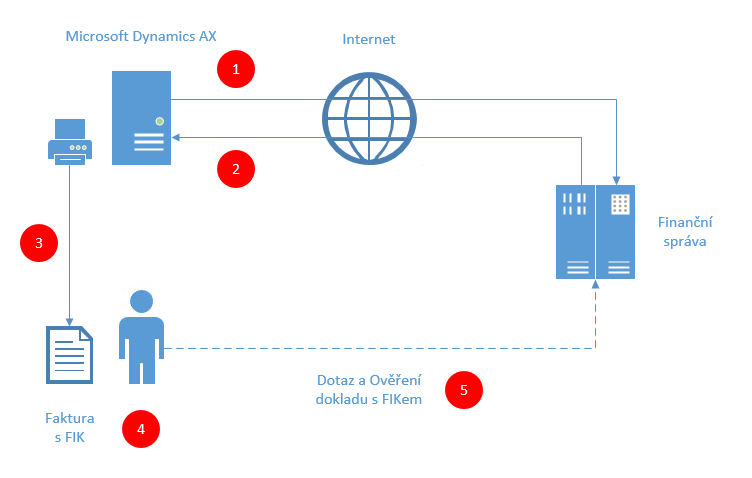
In Dynamics AX, the EET process begins with creating a sales order and issuing an invoice. When the document is posted, data is transmitted to the Financial Administration, required information is added to the invoice, and the document is printed. In case of errors (incorrect data, internet outage, invalid certificate, etc.), an automatic email is sent to the responsible employee about unsubmitted or failed messages.
We are fully ready for EET. We have developed a universal solution that allows you to issue a compliant invoice with all mandatory information. In Microsoft Dynamics AX, the solution works with the invoice posting process, where the payment method determines whether the transaction is subject to EET reporting.
EET and our universal solution: – Issues invoices with all required data – Identifies payment type relevant for EET reporting.
If your system doesn’t use POS registers or includes custom modifications, we can adapt our EET solution to fit your existing processes. Before implementation, we always verify configuration and connection validity.
Our solution includes:
Full description of the EET solution for Dynamics AX (PDF)

Our EET solution for Dynamics AX is available as an Addon for Dynamics AX and Dynamics 365 in our Dynamics app store — Addons.Blue.
How to handle EET in AX? We have a solution!
/ Laten we praten — of u nu al weet wat u nodig hebt of gewoon de mogelijkheden wilt verkennen.

B/ue Dynamic NL
Lange Viestraat 2 B, 3511 BK Utrecht
Netherlands
Blue Dynamic, B.V.
KVK: 83303308
BTW: NL862820972B01
B/ue Dynamic CZ
Prazska 239, 250 66 Praag
Tsjechische Republiek
Blue Dynamic, s.r.o.
ICO: 02339234
DIC: CZ02339234