/Technologieën




/
article
/
The purpose of this article is to show examples of using reporting built on our delivered Microsoft Dynamics CRM solution to support sales, planning, and evaluation of the sales process.
The following sections present selected reports most commonly used in Microsoft Dynamics CRM with a brief description. For an effective design of specific reporting you naturally need a deeper knowledge of the customer’s business processes gained through consultations with selected key stakeholders.
The goal of reporting is to provide the sales department and company management with relevant information in an understandable form and to help evaluate and plan sales strategy.
Reporting is your assistant that highlights trend changes or weak spots in the sales process and helps you find solutions.
Turn relationships into profit. Dynamics 365 Sales lets you build strong customer relationships and improve your sales. With Sales you control your sales process from order through sale to creating marketing campaigns.
Reporting is a part of Microsoft Dynamics CRM used for working with reports.
Microsoft Dynamics CRM = CRM tool for supporting sales activities and customer engagement.
Reporting is a Microsoft Dynamics CRM component used for working with reports. A flexible tool for creating custom reports and exporting data and charts to various formats for further analysis.
Marketing is a Microsoft Dynamics CRM component used for building marketing. It helps target customer groups appropriately and capture their attention.
Services Delivery of goods is not the end of customer work. Complaints, suggestions, and issues are handled in this part of Microsoft Dynamics CRM.
This report is one of the basic reports used across all Microsoft Dynamics CRM systems. It provides a concise and quick overview of the status of opportunities tracked in Microsoft Dynamics CRM. The goal is to display the current sales outlook and give a view of the overall situation.
The report can be customized to track other metrics than financial indicators. For example:
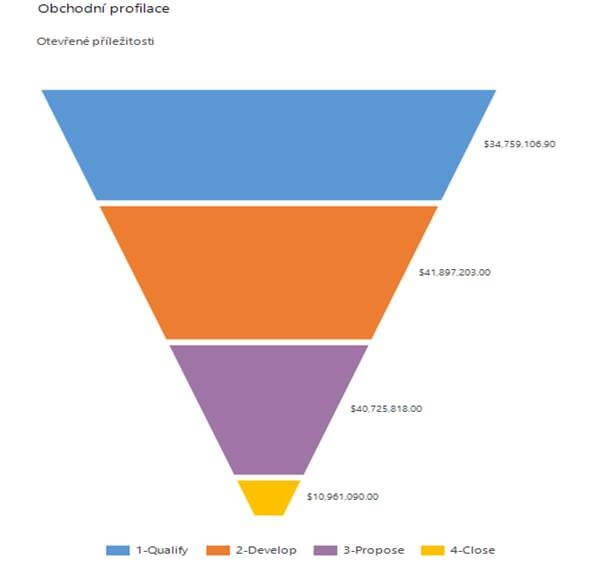
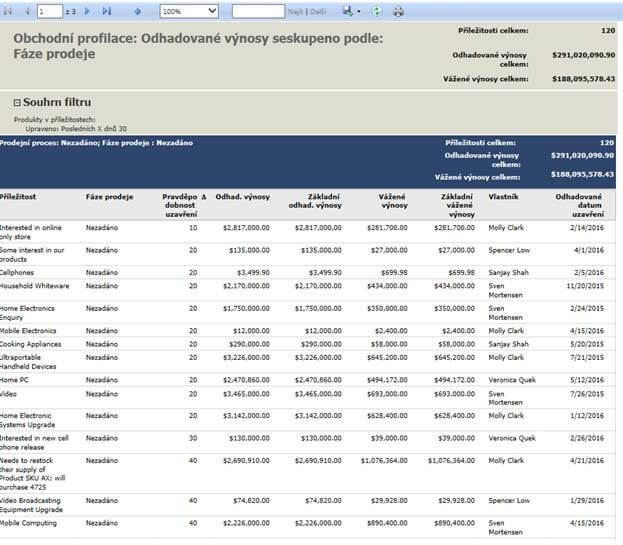
This report lets you track the history of opportunity development over time. It flags negative or positive trends and shows seasonal fluctuations.
You can adapt the report to track non-financial metrics as well.

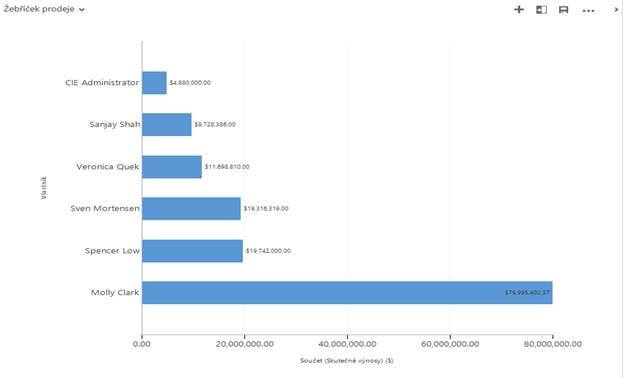
Enables tracking the performance of individual sales reps for a given period. It suits heads of sales and will be less popular with underperformers.
It can be customized to other metrics besides financials.
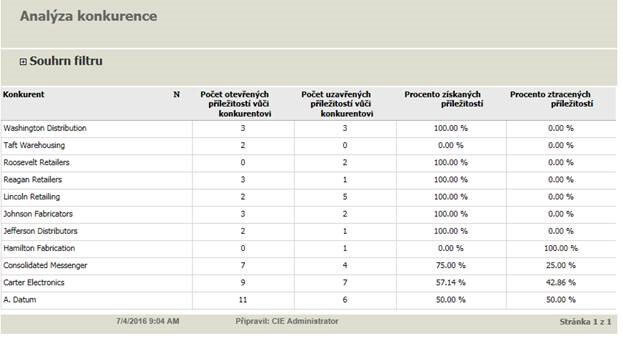
One of the reports used for tracking competitors. It shows how successful we are against a given competitor.
Insights from this report can support analysis of the situation versus a competitor and answer “why the competitor is winning.”
Again, tailor the report as needed or create a variant showing data differently and tracking other metrics.
Suggestion:
For competitor tracking I recommend creating an automatic notification in Microsoft Dynamics CRM to the sales director if a given competitor wins, for example, more than 50% of opportunities.
The goal of this widely used report is to display relationships that have not been contacted for a longer time.
It can be modified as needed and track other metrics.
Suggestion:
CRM can of course set up automatic notifications for relationships not contacted for a set time with filters by criteria and statuses. Such automation partially replaces this report.

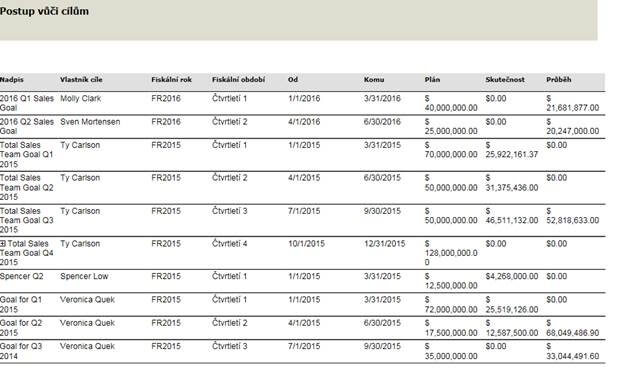
For each period we can set goals for individual reps and teams.
This report enables tracking goal attainment. It can also be adapted to non-financial metrics.
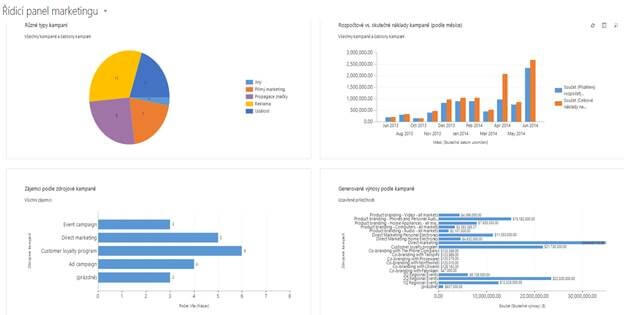
Marketing is a modern way to reach customers. Since marketing is, in my view, an integral part of the sales process and not only in retail, I mention it here briefly.
We invest significant effort in collecting customer data and keeping databases up to date. Why not use this data to target a selected customer group with an offer that captures attention?
In marketing reporting we track campaign success, cost, and collect and evaluate customer feedback.
The sales process does not end with the sale and delivery. Hence this area is included here from a reporting perspective.
Customers may raise issues, complain about goods or delivery. This Microsoft Dynamics CRM component aims to give service staff tools to respond in time, keep situational awareness, and not miss deadlines for handling claims.
Reporting can show clear summaries as well as detailed views, for example costs of handling returns.
Microsoft Dynamics CRM enables easy and quick responses to customer requests.
Suggestion:
Services in Microsoft Dynamics CRM allow setting SLAs for each customer individually per contract terms.
The Microsoft Dynamics CRM solution uses a wide range of reports to support the sales process and includes a flexible tool to create them.
This document mentioned only a few selected reports commonly used by our customers.
For effective reporting you need an analysis of your specific needs. In short, sit down and discuss reporting. What and how you want to track, what information would help your sales process, what is already available in Microsoft Dynamics CRM, and what needs to be added and newly captured.

Antonín Vinš works as a consultant at Blue Dynamic and has experience with implementing Microsoft Dynamics CRM.
Reporting business processes in Microsoft Dynamics CRM
/Laten we praten — of je nu al weet wat je nodig hebt of gewoon de mogelijkheden wilt verkennen.

Kantoor NL
Lange Viestraat 2 B, 3511 BK Utrecht
Nederland
Blue Dynamic, B.V.
KVK: 30137532
BTW: NL805557532B01
Kantoor CZ
Prazska 239, 250 66 Praag
Tsjechische Republiek
Blue Dynamic, s.r.o.
NUMMER: 02339234
NUMMER: CZ02339234